Create a Deduction Register for an individual Deduction Code listing the Employees and their current and Year To Date amounts.
| Access |
| Grant permission to User Profiles in Access User Profiles > select a User Profile > Security > Payroll > Menu Security > Payroll Reports > Deduction Register. |
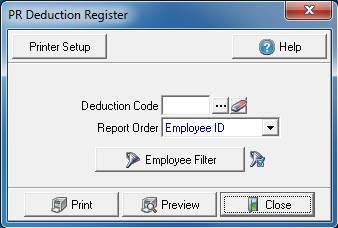
Create Your Report
Enter the Deduction Code or select the Search button. For more information on Deduction Codes, see Access Deduction Codes.
Select the Report Order of the report.
- Employee ID
- Employee Name
- Department
Employee Filter- See Use a Payroll Filter for instructions on applying this filter.
Select Preview to view the report onscreen.
Select Print to send the report directly to the default printer.
View a sample report here.